Redis's 10% expired-key target counts every key with a TTL
Redis deletes expired keys in the background, and its config file says the default effort "will try to avoid having more than ten percent of expired keys still in memory." Ten percent of what turns out to matter. I wrote 100 keys a second with a 10 second TTL into a Redis 8.10 instance that also held a million keys with a one-day TTL. At any moment 1,000 short keys were alive, and about 109,000 dead ones were still in memory. A dead key stayed for about 18 minutes on average. When I moved the short keys to their own database, 99 dead ones were left.
How the expire cycle decides to stop
Expired keys go away in two ways. Reading one deletes it on the spot. Keys nobody reads again are left to the active expire cycle in activeExpireCycle, which runs 10 times a second by default. The EXPIRE docs say it "tests a few keys at random". The current code doesn't sample at random. It walks the table of keys that have a TTL with a scan cursor, remembered between runs, about 20 keys at a time. After each batch it checks what share of the batch had expired. If that share is more than 10%, it takes another batch. Otherwise it stops until the next run (lines 425–447). A faster cycle between commands also starts only when a running estimate of that share is 10% or more, or when the last run ran out of time.
So the cycle aims for about 10% expired among all the keys with a TTL it walks past, not among the keys that are actually expiring. A day-long session key counts in the denominator the same as a 10 second rate-limit counter. With a million day-long keys, the cycle settles once roughly 100,000 dead keys are spread among them (84,000 to 183,000 in my runs), however few short keys are alive. Keys without any TTL aren't in that table, so they don't dilute it.
The test
Each run used a fresh Redis 8.10.2 container (official image, one CPU, default settings except as noted). A client first wrote L keys with a one-day TTL, then wrote R new keys per second with a 10 second TTL and 100-byte values, which nobody ever read again. Every second it read INFO. Dead keys are the key count minus the long keys minus the short keys written in the last 10 seconds. Each run lasted 25 minutes, and the table reports the mean of the last 5. I repeated three of the configurations, and the repeats came within 1% of each other.
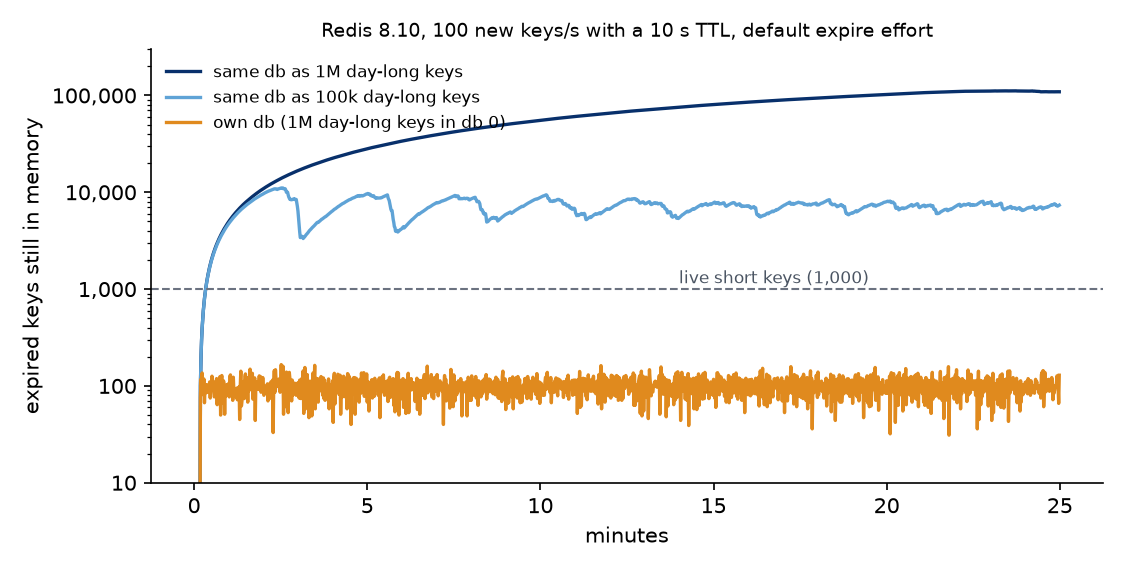
With a million long keys the count is still climbing for 20 minutes, because at the start the cursor moves only about 20 keys per run while dead keys are sparse.
| Day-long keys | Short keys/s | Live short keys | Dead keys (effort 1) | Dead keys (effort 10) |
|---|---|---|---|---|
| 0 | 100 | 1,000 | 87 | 9 |
| 0 | 1,000 | 10,000 | 959 | 211 |
| 0 | 10,000 | 100,000 | 16,392 | 3,748 |
| 100,000 | 100 | 1,000 | 7,141 | 861 |
| 100,000 | 1,000 | 10,000 | 9,293 | 2,279 |
| 100,000 | 10,000 | 100,000 | 32,771 | 7,569 |
| 1,000,000 | 100 | 1,000 | 108,875 | 8,379 |
| 1,000,000 | 1,000 | 10,000 | 84,184 | 20,872 |
| 1,000,000 | 10,000 | 100,000 | 182,951 | 41,224 |
Without long keys the target works as described: dead keys are 9–10% of live ones at 100 and 1,000 keys a second, and 16% at 10,000. Next to a million day-long keys, the slowest stream is the worst off: 109 dead keys for every live one, or about 29 MB of dead keys with these 100-byte values against 0.2 MB of live ones. The dead count tracks the size of the whole TTL table, between 7% and 14% of it at the default effort, so a slower stream gets proportionally more of it.
What changes it
A separate database. Each database has its own TTL table and its own cursor, and the cycle visits all of them on every run. With the million long keys in database 0 and the short keys in database 1, dead keys dropped to 99 at 100 keys a second and 1,389 at 1,000, against 87 and 959 when the short keys had an instance to themselves. In cluster mode there's only database 0, so this means a separate instance.
active-expire-effort 10. The maximum effort lowers the stop threshold to 1% and lets each run take bigger batches and more time. It cut dead keys by 4 to 13 times, but next to a million long keys a 100 key/s stream still had 8 dead keys for each live one. The expire cycle's CPU went from 6.5 to 10.4 ms per second in the million-key, 1,000 key/s run, about 1% of a core.
Raising hz doesn't help much. At hz 100 dead keys went from 84,184 to 74,926. The cycle isn't short of time; it stops on purpose once a batch looks clean enough.
Two practical notes. DBSIZE and the keys= count in INFO keyspace include these dead keys, so they overstate what's live. And expired_stale_perc in INFO stats is that same running estimate of the expired share among scanned TTL keys. It sat at 9.4% in the run with 109 dead keys per live one, which looks healthy.
Versions: Redis 8.10.2 (Docker Hub redis:8) on Linux arm64, default hz 10 with dynamic-hz on and a single client connection. Source read at the 8.10.2 tag; activeExpireCycle is unchanged on unstable as of this week. Dead keys counted from INFO keyspace once a second; values 100 bytes; memory from used_memory against the level after loading the long keys.